
Affiliate Disclosure: VPNexp.com is reader-supported. We may earn a commission if you purchase a VPN through links on our site. This does not affect our rankings or recommendations.
Smart DNS is usually better if you only care about unblocking streaming libraries as fast and simply as possible, while a VPN is the better all‑round choice if you also want privacy, security, and reliability. For most people, a quality VPN with a built‑in Smart DNS feature is the most flexible option.
Smart DNS vs VPN for Streaming — Which Should You Use?
If you’ve ever hit the “this title isn’t available in your region” wall, you’ve probably heard that both Smart DNS and VPNs can help. They solve similar problems in very different ways, and the right choice depends on how much you care about privacy versus pure streaming convenience.
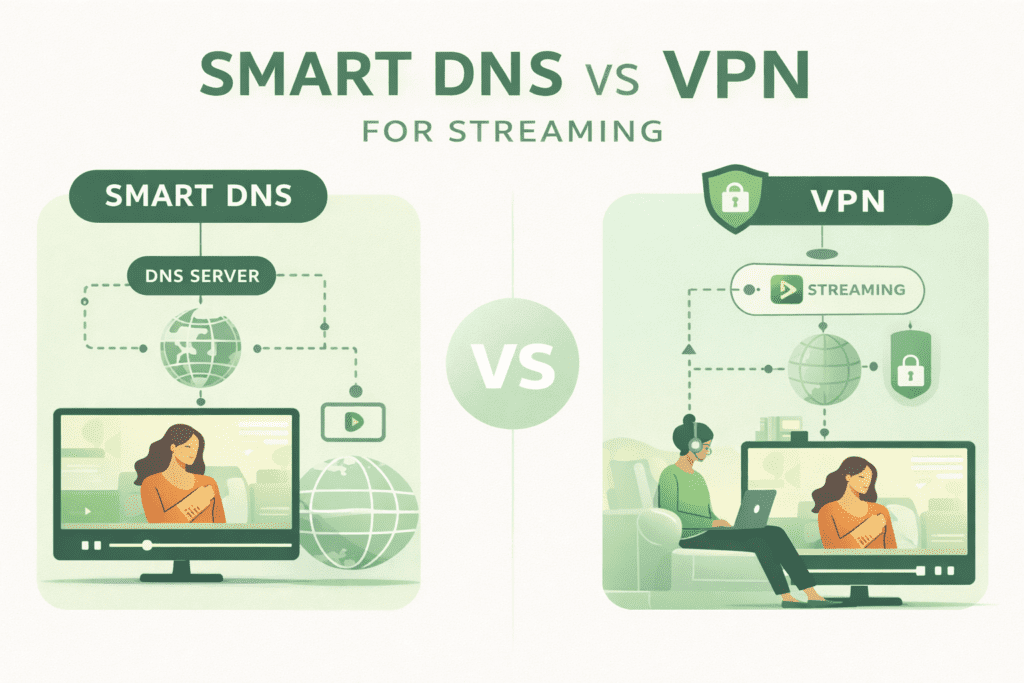
Table of Contents
How Smart DNS and VPNs Work (Without the Jargon)
What Smart DNS actually does
A Smart DNS service tweaks how your DNS requests (the “address lookups” your device does when you visit a site) are resolved for specific streaming domains. Instead of sending all your traffic through a remote server, it selectively routes only the bits needed to convince a streaming service you’re in a different region.
Key points:
- Your IP address usually stays the same, so websites and your ISP still see your real location and traffic.
- Only DNS requests for supported services (Netflix, Hulu, BBC iPlayer, etc.) are rerouted.
- Because there’s no encryption, overhead is minimal and speeds are typically close to your base connection.
Effectively, Smart DNS is a precision tool for region‑shifting streaming content, not a privacy product.
What a VPN does for streaming
A VPN (virtual private network) creates an encrypted tunnel between your device and a VPN server. All your traffic goes through that server, and sites see the server’s IP and location, not yours.
Key points:
- Your data is encrypted, which protects it from ISPs and local network snoops.
- Your public IP changes to match the VPN server location, which helps you appear to be “in” another country for streaming.
- Encryption and routing overhead can reduce speed slightly vs a Smart DNS, though good providers keep this negligible on decent connections.
So a VPN is a general‑purpose privacy and location‑shifting tool, with streaming as one of many uses.
Smart DNS vs VPN: At‑a‑Glance
| Factor | Smart DNS | VPN | Winner |
|---|---|---|---|
| Streaming speed | Very close to base speed (no encryption) | Slight overhead from encryption, usually minor with good services | Smart DNS |
| Privacy & security | No encryption, no IP masking | Full encryption and IP masking | VPN |
| Unblocking reliability | Good for supported services, can break when platforms change methods | Often more resilient, plus extra obfuscation tools on top‑tier VPNs | VPN |
| Device compatibility | Great for smart TVs, consoles, set‑top boxes | Apps on most platforms, router installs for everything else | Tie |
| Ease of setup | Manual DNS changes per device | Install app, login, click to connect; more complex on routers | Tie |
| Cost | Often cheaper than full VPNs | Wider range; high‑end services cost more | Smart DNS |
When Smart DNS Is the Better Option
If you care almost exclusively about streaming performance and don’t need extra privacy, Smart DNS can be the more convenient tool.
1. You only care about unblocking streaming libraries
Smart DNS is tuned specifically to unblock geo‑restricted streaming content by rerouting just the bits needed to fool region checks. Many providers focus on the most in‑demand platforms (Netflix regions, BBC iPlayer, Hulu, Disney+, and sports services).
It makes sense when:
- Your primary goal is to watch shows and sports from a few specific countries.
- You’re not using public Wi‑Fi for anything sensitive.
- You handle privacy separately (e.g., at the router, or you simply accept the risk).
Independent guides consistently describe Smart DNS as effectively “speed‑first region shifting,” explicitly noting its lack of encryption and limited scope.
2. You want maximum speed for 4K and live sports
Because Smart DNS does not encrypt your traffic or route everything through a remote server, it introduces far less overhead than a VPN. That usually means:
- Higher peak throughput for ultra‑HD streams.
- Lower chance of buffering on borderline connections.
- Less variability in latency during live events like sports.
For example, user‑reported experiences and vendor‑side documentation both point out that Smart DNS typically has “almost no impact” on connection speed compared to VPNs, which may shave a bit off your top line throughput depending on distance and congestion.
3. You need support for devices that don’t like VPN apps
Many smart TVs, streaming sticks, and game consoles either don’t support VPN apps at all or support them poorly. Smart DNS works well here because you can usually:
- Change DNS settings on the device itself.
- Or set Smart DNS on your router, covering every gadget automatically.
Some VPN providers bundle Smart DNS specifically to fill this gap—ExpressVPN’s MediaStreamer is a well‑known example. You use the VPN on phones and laptops for security, then use the Smart DNS part on consoles or Apple TV‑style devices that can’t run a full app.
When a VPN Is the Better Option
If you want streaming plus privacy, or you travel a lot, a VPN is the more robust and future‑proof choice.
1. You want privacy, not just a different Netflix
A VPN encrypts all your traffic between you and the VPN server. That means:
- Your ISP can’t easily see what services you’re using or what you’re watching.
- Local networks (cafés, hotels, airports) have a much harder time snooping or injecting ads/malware.
- Your IP address is replaced by the VPN server’s IP, helping limit trivial location tracking.
Smart DNS offers none of that; your IP remains visible, and your connection is unencrypted.
Independent explainers repeatedly emphasize this: Smart DNS is not a security tool and should not be used as a substitute for a VPN when privacy is a concern.
2. You travel or use public Wi‑Fi often
If you stream on hotel Wi‑Fi, airport networks, or public hotspots, a VPN gives you an extra layer of protection:
- Encryption shields your traffic on untrusted networks.
- Some VPNs add features like malicious site blocking or tracker blocking.
- You can also avoid certain forms of bandwidth throttling tied to video recognition, because your ISP sees mostly encrypted VPN traffic.
Smart DNS doesn’t hide what you’re doing from the local network or ISP, so it doesn’t address those risks.
3. You want one tool for streaming, browsing, and general security
A good VPN doesn’t just help you swap Netflix regions. It gives you:
- Encrypted tunnels for all apps, not just streaming.
- Protection for torrenting and other high‑risk activities (where allowed by law).
- Often, features like kill switches, split tunneling, and multi‑hop routing.
Guides that compare DNS, Smart DNS, and VPNs typically recommend VPNs as the “default” choice when people care about both privacy and access to geo‑restricted content.
Streaming Experience: Smart DNS vs VPN
| Streaming Aspect | Smart DNS | VPN | Winner |
|---|---|---|---|
| 4K & HDR performance | Often closest to raw ISP speed, minimal overhead | Slight drop is possible, but good VPNs handle 4K fine | Smart DNS (speed‑only) |
| Live sports consistency | Strong, if your base connection is stable | Good, but long‑distance servers can add jitter | Smart DNS |
| Library coverage | Focused on major platforms, varies by provider | Wide coverage; top VPNs invest heavily in streaming access | VPN |
| Blocking resilience | Can break when platforms change DNS‑detection tactics | Often more resilient thanks to IP rotation and obfuscation | VPN |
In user communities and review roundups, you’ll see consistent themes:
- Smart DNS works “great—until it doesn’t,” because small changes in how a platform checks location can break things until the provider reacts.
- High‑end VPNs treat streaming access as a core feature and maintain large pools of IPs specifically to stay ahead of blocks.
If you mainly watch on a TV and almost never use public Wi‑Fi, Smart DNS can feel smoother. If you watch across devices and travel, a VPN tends to be less fragile long term.
Best Use Cases for Each (With Examples)
Use Smart DNS if…
You’re a heavy streaming household that mostly cares about simple region switching on TVs and consoles, and you’re okay with your ISP still seeing your traffic.
Good examples:
- You want to access UK BBC iPlayer and US Netflix from a single living room TV, and everything else is done on a separate, locked‑down work laptop.
- You stream almost exclusively at home on a fast fiber connection, and you never connect sensitive accounts from that TV or console.
In these scenarios, Smart DNS’s low overhead and “set‑and‑forget” setup on TVs and consoles are genuinely convenient.
Use a VPN if…
You care about both streaming and privacy, or you share one connection across many devices—including laptops and phones on the go.
Good examples:
- You travel regularly, log into banking and email over hotel Wi‑Fi, and also want consistent access to your home streaming libraries abroad.
- You want to reduce ISP‑level profiling and possible throttling while streaming and browsing.
Guides from networking and consumer‑tech sites consistently position VPNs as the better “all‑rounder” for this blend of needs.
Combine both when possible
Some services bundle Smart DNS with a VPN, letting you:
- Use the VPN on laptops and phones for full protection.
- Use Smart DNS on TVs, consoles, and other “dumb” devices that can’t run VPN apps.
This hybrid setup often gives the best of both worlds for households with a mix of device types.
Recommended VPNs for Streaming (Plus Smart DNS Options)
Independent testing and long‑term user reports tend to favor a similar shortlist of VPNs for streaming: reliability with major platforms, fast speeds, and transparent privacy practices. Below are a few that stand out for streaming‑focused use.
1. NordVPN
NordVPN is widely cited for strong performance, large server coverage, and a focus on streaming support. External reviews highlight:
- Good speeds and stable connections suitable for HD and 4K streaming.
- A large set of servers in popular streaming regions.
- Strong security features (kill switch, modern protocols, audited no‑logs claims).
You can use NordVPN on most platforms, and configure it at the router level for devices that can’t run apps.
2. Surfshark
Surfshark is often recommended as a streaming‑friendly VPN with competitive pricing and unlimited simultaneous connections, which is useful for larger households. Third‑party reviews commonly note:
- Consistently good speeds for HD and 4K streaming.
- Reliable access to popular streaming services across multiple regions.
- Extras like ad/tracker blocking and a modern protocol stack.
Surfshark also supports a wide range of devices and works well when installed on compatible routers.
3. Proton VPN
Proton VPN is frequently highlighted for its privacy posture and open‑source apps, along with solid streaming support on paid tiers. External sources point out:
- Strong security design and independent audits focused on privacy.
- Capable speeds suitable for streaming on paid plans.
- Dedicated streaming‑friendly servers in key regions.
If you want a service that leans heavily into transparency and privacy while still handling streaming, Proton VPN is a strong candidate.
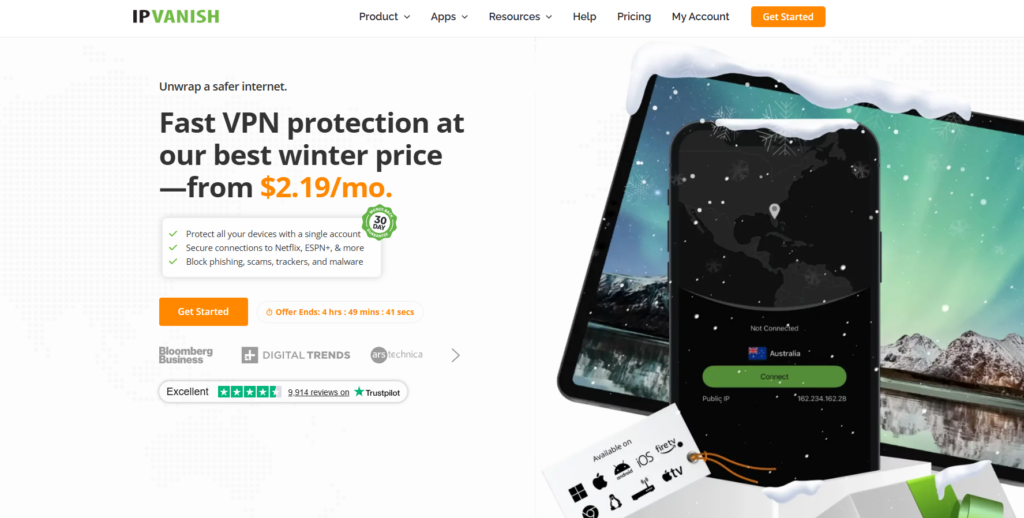
4. IPVanish
IPVanish often appears in streaming VPN roundups for its speed‑oriented network and broad device support. Reviewers and user reports typically highlight:
- Fast connections across many regions, good for HD streaming.
- Apps for major platforms and flexible connection limits.
- Emphasis on performance and straightforward configuration.
It can be a good fit if you want performance and simple, no‑frills apps.
Smart DNS vs VPN: Practical Scenarios
| Scenario | Best Fit | Why | Winner |
|---|---|---|---|
| Single TV, home fiber, only Netflix & Hulu | Smart DNS | Simple region‑shift, near‑zero speed loss | Smart DNS |
| Frequent traveler, streams on hotel Wi‑Fi | VPN | Needs encryption + region access | VPN |
| Family with many devices + consoles | VPN + Smart DNS | VPN on phones/laptops, Smart DNS on TVs/consoles | Combo |
| Privacy‑conscious user, light streaming | VPN | Stronger protection and flexible use cases | VPN |
| Budget user, only home streaming | Smart DNS | Often cheaper, focused functionality | Smart DNS |
Setup and Maintenance: What to Expect
Smart DNS setup
Typical setup steps:
- Sign up, obtain Smart DNS IPs from your provider.
- Change DNS servers on your device or router.
- Register your IP with the provider if required.
Maintenance considerations:
- If your ISP gives you a dynamic IP, you may sometimes need to re‑register it with the service.
- When streaming services change detection methods, you might need to wait for your Smart DNS provider to update their side.
VPN setup
Typical setup:
- Install the VPN app on your device.
- Log in, pick a server in your target country, and connect.
Router‑level installs are more complex but cover all devices at once. Maintenance is often lighter in day‑to‑day use—many apps let you auto‑connect on startup and remember last used locations.
Legal and Policy Considerations
Most streaming platforms’ terms of use discourage or prohibit bypassing regional licensing, whether via Smart DNS or VPN. However:
- Using a VPN or Smart DNS is generally legal in many countries; the grey area tends to be terms‑of‑service compliance, not criminal law.
- Services may respond by blocking connections, not by pursuing users individually.
You should always review local laws and the terms of your streaming services, and make your own decision about acceptable use.
FAQs
Is Smart DNS safer than a VPN for streaming?
No. Smart DNS does not encrypt your traffic or hide your IP; it is not a security product. A VPN encrypts your traffic and masks your IP, making it the safer option on public or untrusted networks.
Will a VPN always be slower than Smart DNS?
Not always, but Smart DNS typically has a speed edge because it doesn’t encrypt or reroute all your traffic. On fast connections with a good VPN, the difference is often small enough that 4K streaming still works smoothly.
Can streaming services detect Smart DNS or VPN use?
Yes. Both can be detected and blocked. Streaming services may look at IP ranges associated with VPNs or analyze DNS patterns to spot Smart DNS usage. High‑quality VPNs and Smart DNS providers invest in workarounds, but no solution is 100% reliable all the time.
Do I need both Smart DNS and a VPN?
You don’t need both, but combining them can make sense. Many people use a VPN on laptops and phones for privacy, and Smart DNS on TVs and consoles that don’t support VPN apps well.
Which should I choose if I’m unsure?
If you’re undecided and you care even a little about privacy or travel, a good VPN is the safer default. Independent guides generally recommend VPNs as the more versatile option that also covers streaming. If, after using it, you find TV‑side setup clunky, you can add Smart DNS later—ideally from the same provider.
Sources
- Reddit community discussion: Smart DNS vs VPN speed and security trade‑offs.[reddit]
- AstrillVPN: DNS vs Smart DNS vs VPN overview and use‑case guidance.[astrill]
- SmartDNSProxy: Smart DNS performance claims for streaming.[smartdnsproxy]
- GeeksforGeeks: DNS, Smart DNS, and VPN comparison and recommendations.[geeksforgeeks]
- StreamLocator: Practical differences between VPN and Smart DNS for streaming.[streamlocator]
- Gizmodo: DNS vs VPN guide with streaming use cases.[gizmodo]
- Evomi: SmartDNS vs proxies vs VPN, with emphasis on speed and privacy limits.[evomi]
- ExpressVPN blog: DNS vs VPN vs Smart DNS, including MediaStreamer use on devices.[expressvpn]
- HideMyAss blog: Smart DNS advantages and limitations.[blog.hidemyass]
- Top10VPN YouTube guide: VPN vs Smart DNS use‑case breakdown.[youtube]